Discovering your Public IP Address
If you have a dynamic IP, or are unsure, you should jump to the Dynamic Address section below.
If you have a static public IP address(es), you should have been told by your ISP what they are in the materials they provided to you when you signed up.
If not, you may infer them as they should match the IP addresses your workstation and mobile devices use when connected to your existing wireless network from an online IP reporting tool from your web browser.
On this page, you will need to make a note of both the IPv4 and IPv6 addresses shown. The IPv4 address can be used as is, but the IPv6 address you should convert by:
-
Pasting your IPv6 address in to the ‘IPv4 or IPv6 address’ field
-
Selecting ‘/56’ from the drop down to the right of the field
-
Clicking on the btn:[Calculate]
-
Using the value given in the ‘Subnet Prefix (CIDR notation)’ field below.
For example 2001:db8:1234:5601:8c8d:8fb4:f5d7:11c0 becomes 2001:db8:1234:5600:0:0:0:0/56.
| It is okay if only one of the two IP addresses (often the IPv6 address) is not listed. This is due to a limitation of your ISP (or router) though fortunately not something most users would be aware of. |
Dynamic Address
If you have only a dynamic public IP address(es), or do not know so assume they are, you will need to use an online tool from your browser to create a usable approximation for your address(es) in CIDR notation.
| If your wireless equipment does not support RadSec or your router or an on-premise VPN appliance does not support making a VPN connection to Azure, it is strongly recommended you use an ISP that provides you with ‘static (fixed) IP addresses’. Where this is the case, and you still plan to use dynamic IPs (common for non-business tier ISP services) when your router reconnects to the Internet your public IP address(es) will change and the effect will be that your wireless network will stop working until you update the device IPs configuration made above with the new addresses. For those where RadSec or a VPN is an available option to you, a later guide will walk you through implementing a more resilient (and secure) configuration suitable for use with dynamic public IP address(es). |
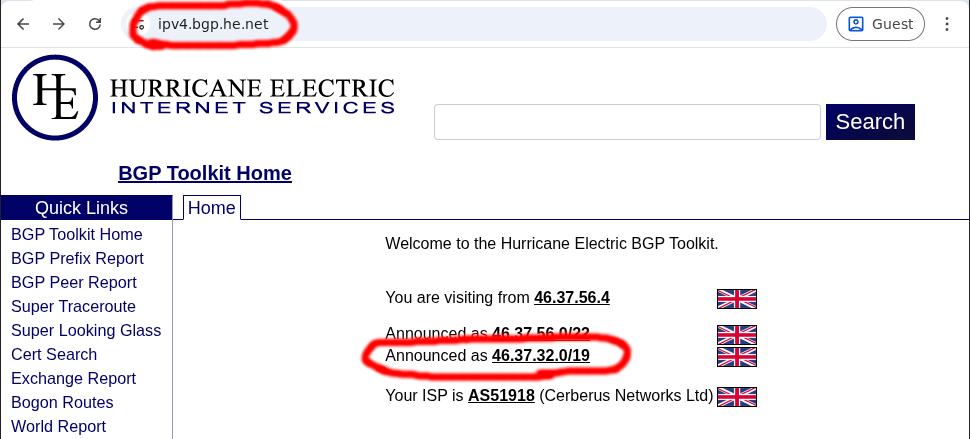
If you have an IPv4 address, then open https://ipv4.bgp.he.net/ and capture the bottom most ‘Announced’ listed CIDR:
If you have an IPv6 address, then open https://ipv6.bgp.he.net/ and capture the bottom most ‘Announced’ listed CIDR:
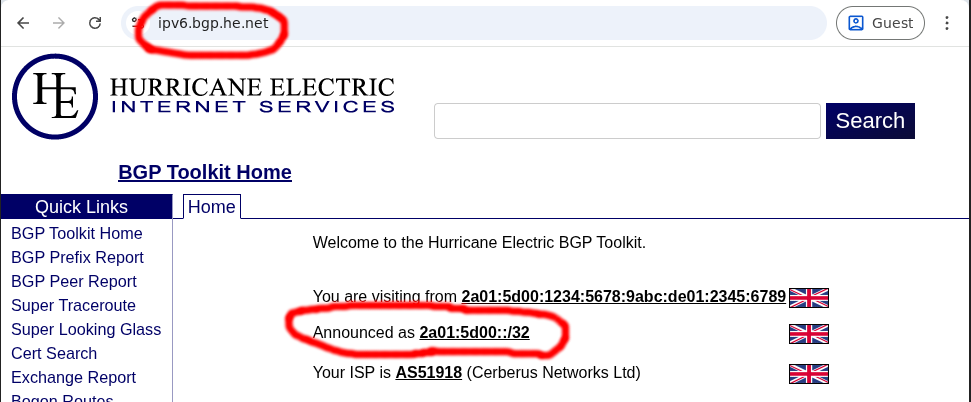
| You may find the IPv6 address page above does not open for you, this is okay and you can just skip collecting the results there, but you must have at least an IPv4 address. |
Now use these obtained CIDR’s to configure RADNAC as per the instructions above.
| These CIDRs are approximations and only suitable only for the purpose of the quickstart demo. |